
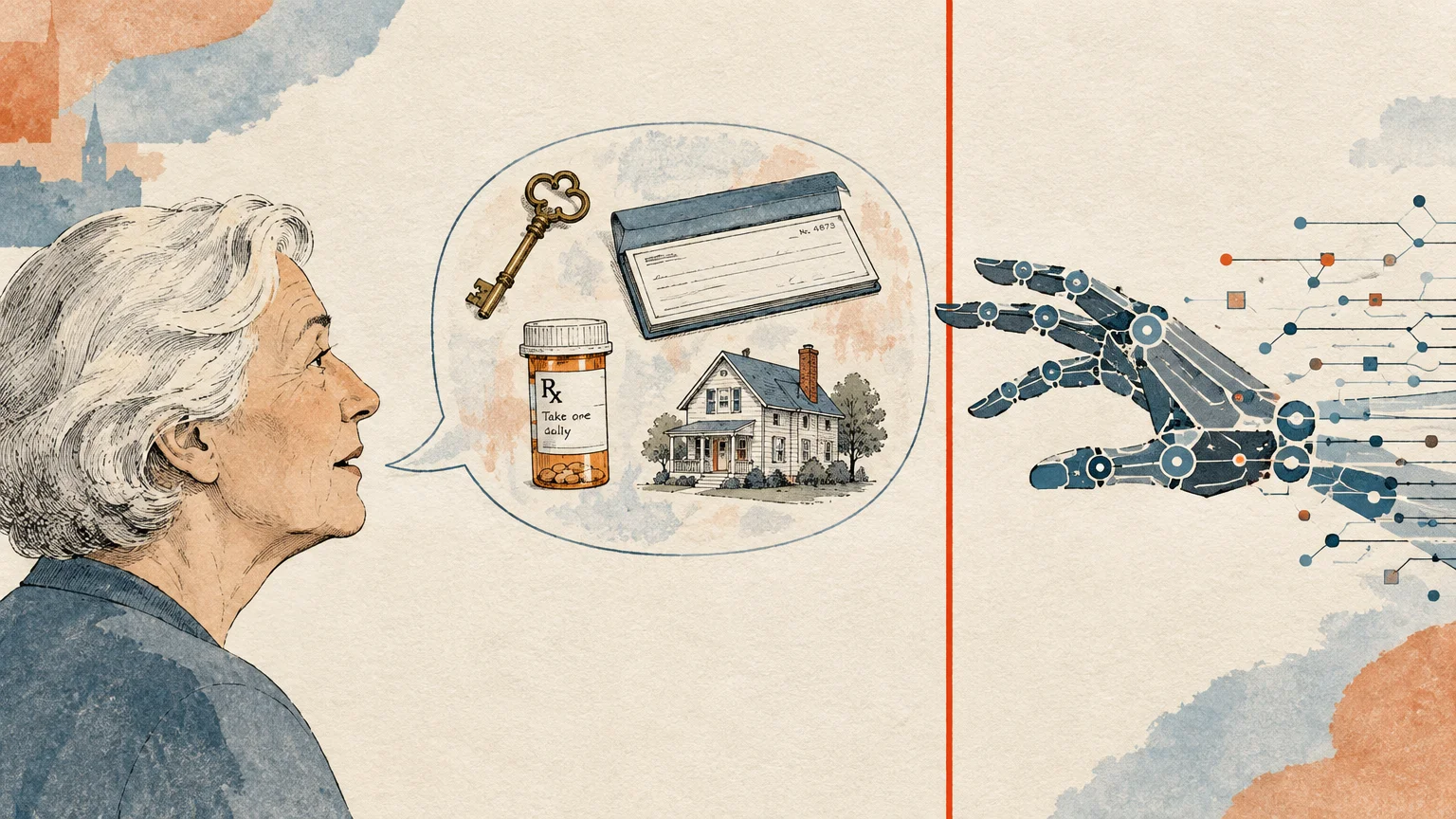
Artificial intelligence tools can simplify your daily routine, but sharing the wrong details puts your identity at serious risk. You can explore modern technology safely once you know which personal boundaries to establish.
Chatbots feel like friendly companions, yet they store and analyze nearly everything you enter into the chat window. Keeping your sensitive information private ensures you enjoy the benefits of digital tools without exposing your household to fraud.
Learning what to keep private is the easiest way to safeguard your retirement assets and maintain your peace of mind. Here is your essential guide to protecting your personal data when using popular artificial intelligence programs.
In this guide9 sections
- Why AI Privacy Matters for Older Adults
- How AI Chatbots Store and Use Your Data
- Comparison of AI Privacy and Retention Settings
- 10 Things You Should Never Tell an AI Chatbot
- Real-World Risks: Data Leaks and Human Reviewers
- Step-by-Step Guide to Locking Down Your AI Privacy Settings
- Common Mistakes and Emerging AI Scams Targeting Seniors
- Safe and Practical Ways to Use AI Everyday
- Frequently Asked Questions
Why AI Privacy Matters for Older Adults
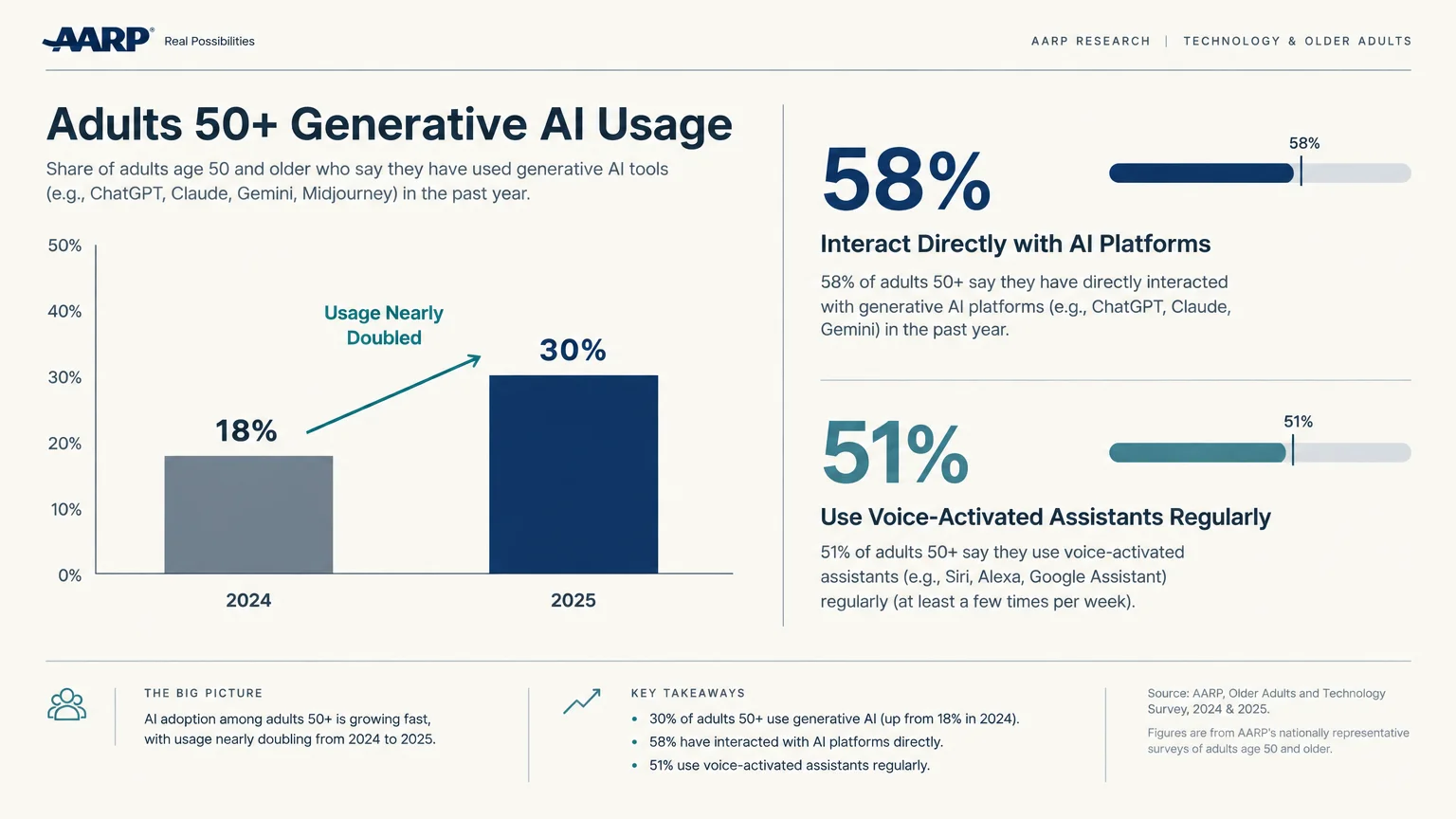
According to AARP, generative AI usage among adults aged 50 and older nearly doubled in one year, rising from 18% in 2024 to 30% in 2025.
Their research reveals that 58% of these older adults interact directly with specific AI platforms, while 51% regularly use voice-activated assistants.
Many seniors turn to these digital tools to research wellness topics, draft personal emails, or explore creative hobbies.
Because chatbots respond with polite, warm, and conversational phrasing, it is easy to view them as trusted confidants.
However, treating a computer program like a trusted human advisor can expose your personal life to unnecessary digital risks.
Older Americans hold substantial retirement savings and home equity, which makes them prime targets for identity thieves.
When you accidentally reveal private information in a chat window, that data can be saved, processed, and potentially exposed.
Understanding chatbot safety allows you to enjoy modern technological conveniences while keeping your personal assets thoroughly shielded.
How AI Chatbots Store and Use Your Data
When you type a message to an AI chatbot, your words do not disappear after you close your browser.
Major platforms—including ChatGPT, Claude, Google Gemini, Microsoft Copilot, and Grok—routinely use consumer conversations to train future models by default.
This practice means your questions, uploaded documents, and personal anecdotes become part of the massive dataset that powers the system.
Data retention policies vary across tech providers, making it important to know how each company handles your records.
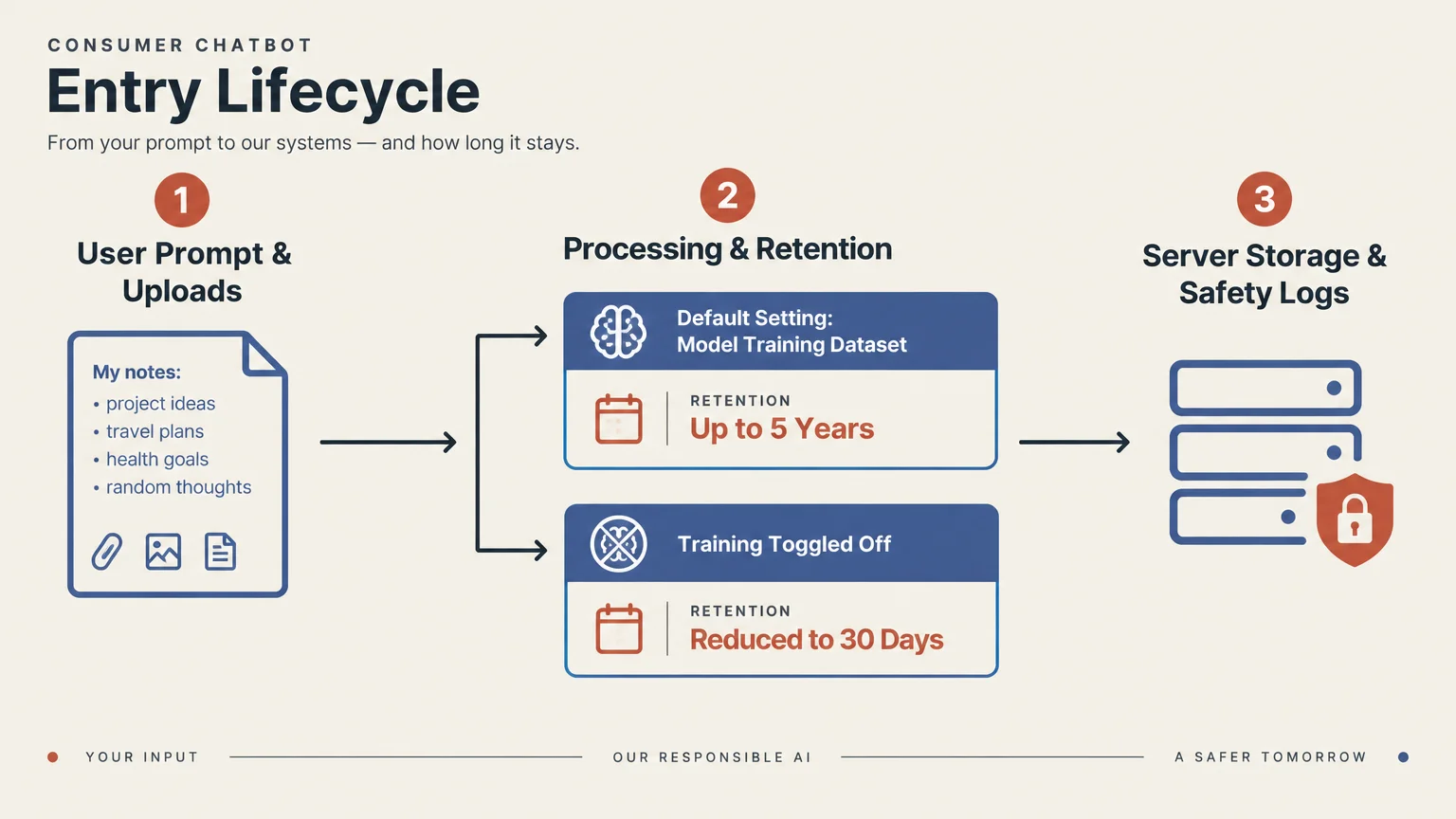
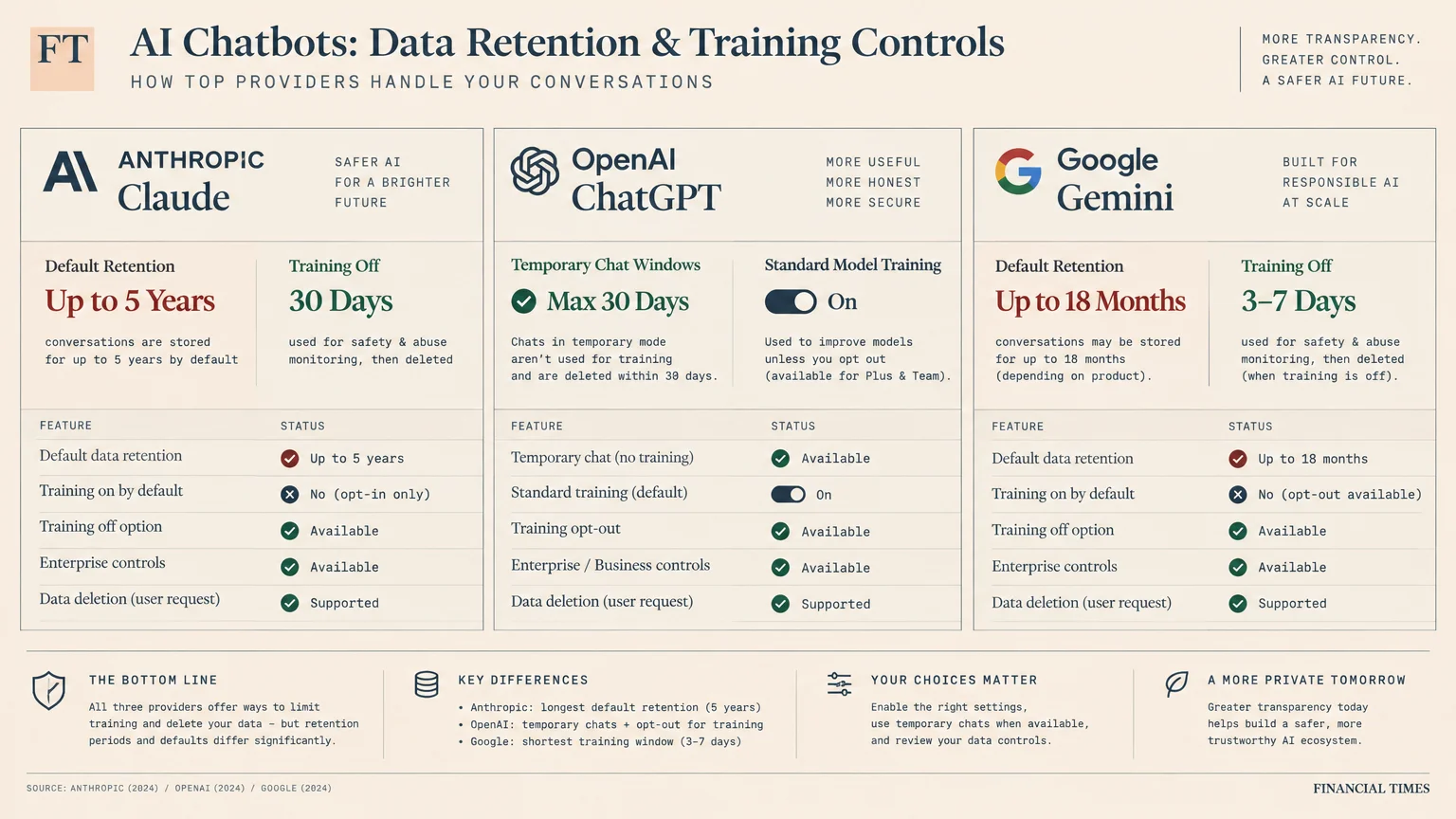
For instance, Anthropic retains consumer Claude conversations for up to 5 years under its standard default settings.
If you manually toggle off training in Claude, the company shrinks that retention period to 30 days.
OpenAI similarly keeps temporary ChatGPT conversations for up to 30 days to monitor for abusive or harmful behavior.
Google Gemini also trains on your chat entries, uploaded files, and images unless you disable your activity tracking.
Meta AI operates with even stricter rules for residents living within the United States.
U.S. users cannot opt out of AI training on Meta AI chats, and the company uses interactions for ad targeting.
You should also understand the retroactivity rule enforced across the technology sector.
Opting out of data training only safeguards future conversations; it never erases information you submitted in the past.
Comparison of AI Privacy and Retention Settings
Reviewing how different conversational tools store your private records helps you select platforms that respect your privacy preferences.
The table below summarizes default training behaviors and retention timelines for the most common consumer AI platforms.
| AI Platform | Default Training Policy | Standard Retention Period | Opt-Out Availability |
|---|---|---|---|
| ChatGPT (Free, Plus, Pro) | Trains on consumer chats by default | Up to 30 days for temporary chats; indefinite with history enabled | Yes (Settings > Data Controls) |
| Claude (Free, Pro, Max) | Trains on consumer chats by default | Up to 5 years by default; 30 days when opted out | Yes (Settings > Privacy) |
| Google Gemini | Trains on user chats, files, and photos by default | Up to 18 months under default activity settings | Yes (Turn off Keep Activity) |
| Meta AI | Trains on chats and targets advertisements by default | Indefinite retention according to company policies | No opt-out available for U.S. users |
| Microsoft Copilot | Trains on consumer conversations by default | Retained under Microsoft account consumer privacy guidelines | Yes (Through Microsoft privacy dashboard) |
These settings illustrate why relying on default platform configurations leaves your sensitive personal data exposed to automated collection.
Taking a proactive stance toward your digital privacy ensures your private household information remains confidential and secure.
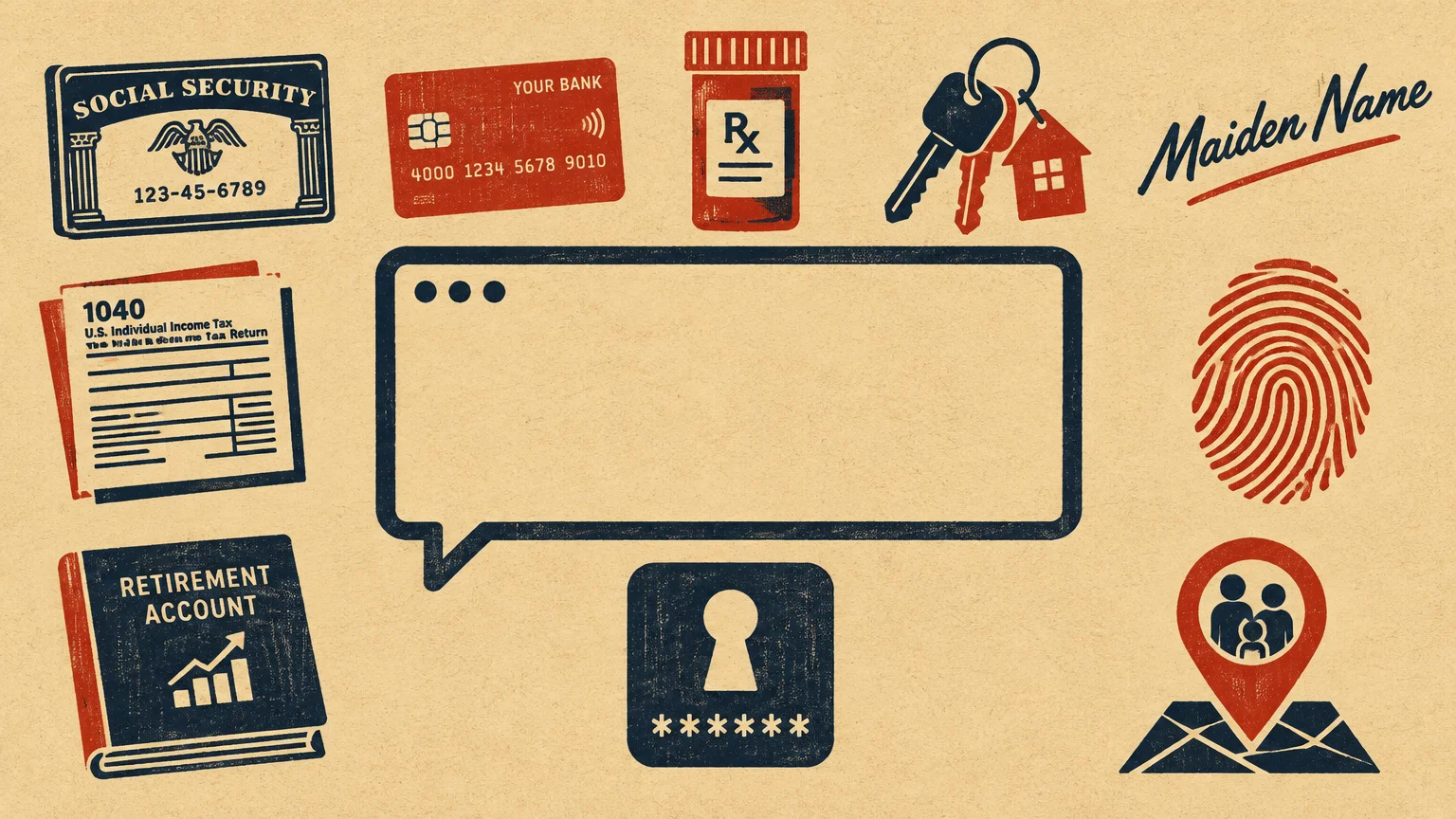
10 Things You Should Never Tell an AI Chatbot
Establishing firm boundaries about what you enter into chat prompts is your best defense against identity theft.
Here are the ten most critical pieces of personal information you should never disclose to an artificial intelligence tool.
1. Social Security Numbers and Government Identifiers
Never enter your nine-digit Social Security number into an artificial intelligence chat window for any reason.
According to the Social Security Administration (SSA), protecting your number prevents thieves from fraudulently redirecting retirement checks or establishing rogue accounts.
You should treat driver’s license numbers, state identification cards, and passport numbers with the exact same caution.
Chatbots do not require your real government numbers to explain claiming ages, spousal benefit rules, or tax filing requirements.
If you paste your real number, it could be reviewed by human annotators or stored in training logs.
Instead of entering real documents, ask hypothetical questions such as, “How does the earnings limit impact early benefits?”
2. Banking Details, Account Logins, and PINs
Keep your checking account numbers, routing numbers, debit card PINs, and credit card security codes away from chatbots.
Guidance from the Consumer Financial Protection Bureau (CFPB) confirms that keeping payment credentials private is your best defense against unauthorized bank transfers.
An AI system cannot directly interface with your local credit union or investment brokerage to transfer funds anyway.
Typing your credentials into an unencrypted prompt simply risks exposing your funds to third-party data breaches.
If you want help creating a retirement budget, use fictional numbers that do not match your real statements.
For example, ask the chatbot to organize a sample monthly budget using rounded estimates like two thousand dollars.
3. Medicare Numbers and Detailed Health Records
Avoid typing your red, white, and blue Medicare card number or comprehensive diagnosis history into an AI tool.
You can research official coverage guidelines directly through Medicare.gov without revealing your personal health records to commercial databases.
A 2026 study published in JAMA revealed that roughly 25% of Americans consult consumer chatbots for medical advice.
However, consumer AI chatbots do not qualify as covered entities or business associates under federal HIPAA privacy regulations.
This legal gap means federal medical privacy protections do not prevent tech companies from storing or analyzing your entries.
Ask general questions about symptoms or drug interactions without disclosing your name, specific dosages, or medical record images.
4. Home Security Codes, Daily Routines, and Travel Dates
Never tell a chatbot your garage keypad code, front door smart lock combination, or home alarm passcode.
You should also avoid sharing specific travel itineraries or announcing that you will be out of town.
Writing that your home will sit empty for three weeks creates physical security concerns if that data leaks.
Similarly, avoid describing your daily walking route, your medication schedules, or the exact hours you stay alone.
When you want vacation planning assistance, ask for regional travel recommendations without mentioning your specific departure dates.
This approach gives you helpful sight-seeing itineraries while keeping your empty residence completely protected from digital eavesdropping.
5. Passwords, Security Questions, and Mother’s Maiden Name
Do not enter your email passwords, Wi-Fi keys, or answers to standard security verification questions into prompts.
Answers like your childhood pet’s name, your favorite teacher, or your mother’s maiden name unlock critical online portals.
Cybercriminals assemble pieces of personal trivia to breach senior accounts and initiate password resets across banking websites.
Even if you want to test whether a password is strong, never paste your actual password string.
Instead, use reputable, standalone password management tools to generate, evaluate, and store complex security credentials offline.
Keeping your security keys separate from conversational tools ensures that curious algorithms never capture your primary online safeguards.
6. Private Family Conflicts and Legal Disputes
Resist the urge to use an AI chatbot to vent about inheritance disputes, contested wills, or family feuds.
Entering names, grievances, and disputed estate assets creates a discoverable written record stored on corporate cloud servers.
Conversations with commercial chatbots do not enjoy legal attorney-client privilege or confidential counselor protections.
Opposing attorneys could potentially subpoena these digital transcripts during probate litigation or contentious family court hearings.
If you want mediation ideas, describe family scenarios using anonymous roles like “Sibling A” and “Sibling B.”
This keeps your discussions focused on general conflict resolution while keeping sensitive estate details entirely off corporate networks.
7. Confidential Work Files and Volunteer Organization Records
Never paste internal business files, church directories, or community association member lists into a chatbot window.
In March 2023, Samsung engineers pasted proprietary code into ChatGPT, inadvertently exposing corporate intellectual property to training pipelines.
If you volunteer for a local charity or civic board, you are responsible for safeguarding other members’ information.
Uploading donor lists or volunteer contact sheets compromises their personal privacy without their informed consent.
When you need help editing a community newsletter or flyer, delete every individual’s name and telephone number first.
Once the chatbot polishes your grammar, you can re-insert the contact details locally on your home computer.
8. Full Investment Portfolios and Exact Net Worth Figures
Avoid disclosing the exact balances of your retirement accounts, brokerage statements, or certificates of deposit.
Revealing your overall net worth alongside your hometown makes it possible to build an accurate profile of your household.
Targeted cybercriminals look for high-net-worth older adults to single out for sophisticated wire fraud schemes.
An AI does not need to know you have four hundred thousand dollars in a specific bank to explain safe withdrawal rates.
Instead, ask conceptual questions like, “What is the four percent rule for retirement withdrawals?”
You gain all the valuable educational insights without exposing your personal financial health to remote cloud databases.
9. Complete Contact Lists and Addresses of Loved Ones
Do not upload spreadsheets containing the home addresses, phone numbers, or birthdays of your children and grandchildren.
Many seniors paste family lists into chatbots to format holiday mailing labels or organize birthday reminders.
This practice enters your family’s personal coordinates into commercial training databases without their direct approval.
Data breaches could subsequently expose your grandchildren’s contact details to aggressive telemarketers or online fraudsters.
To organize address lists, rely on basic spreadsheet software or built-in word processing templates that stay on your hard drive.
Keeping your address book offline is the most loving way to shield your extended family from digital data brokers.
10. Deep Emotional Vulnerabilities and Personal Loneliness
Chatbots are programmed to sound warm, empathetic, and attentive, but they possess neither human feelings nor genuine ethics.
Sharing deep emotional grief, chronic loneliness, or severe cognitive anxieties can create subtle digital vulnerabilities.
Some consumer platforms use behavioral interactions to build marketing profiles that target emotionally vulnerable consumers.
Furthermore, confiding that you live alone can make you susceptible to manipulative prompts from unvetted conversational applications.
When you feel isolated or overwhelmed, reach out to community centers, trusted friends, or local support groups.
Genuine human relationships provide the true empathy, safety, and mutual care that computer algorithms can never deliver.
Real-World Risks: Data Leaks and Human Reviewers
Many users assume their prompts remain locked inside an automated digital vault, but this assumption is incorrect.
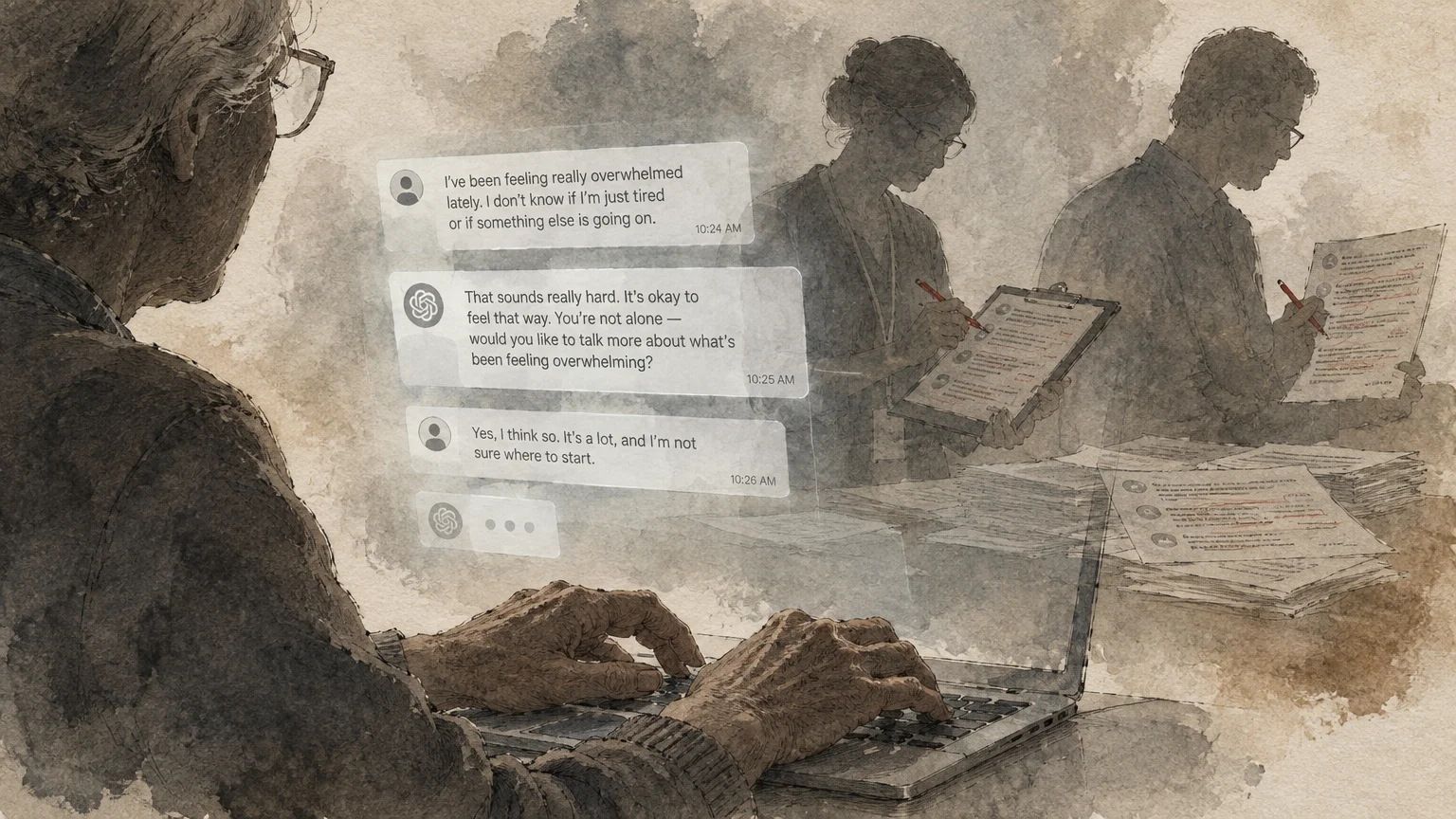
Technology firms routinely employ human contractors to read, grade, and evaluate conversational transcripts to improve chatbot performance.
If you type private health symptoms or sensitive family matters, a real person could review your words on their computer screen.
System glitches and programming bugs also present real hazards for commercial conversational tools.
In March 2023, an open-source database bug in ChatGPT exposed chat history titles and user billing data.
This glitch exposed the names, email addresses, billing addresses, and payment card digits of roughly 1.2% of Plus subscribers.
Beyond system bugs, large language models can experience model regurgitation, where an AI inadvertently repeats another user’s private data.
Federal regulators have noticed these privacy risks; the Federal Trade Commission actively monitors deceptive privacy practices regarding consumer wellness inputs.
Recognizing that digital systems are imperfect helps you maintain realistic boundaries whenever you open an artificial intelligence prompt.
Step-by-Step Guide to Locking Down Your AI Privacy Settings
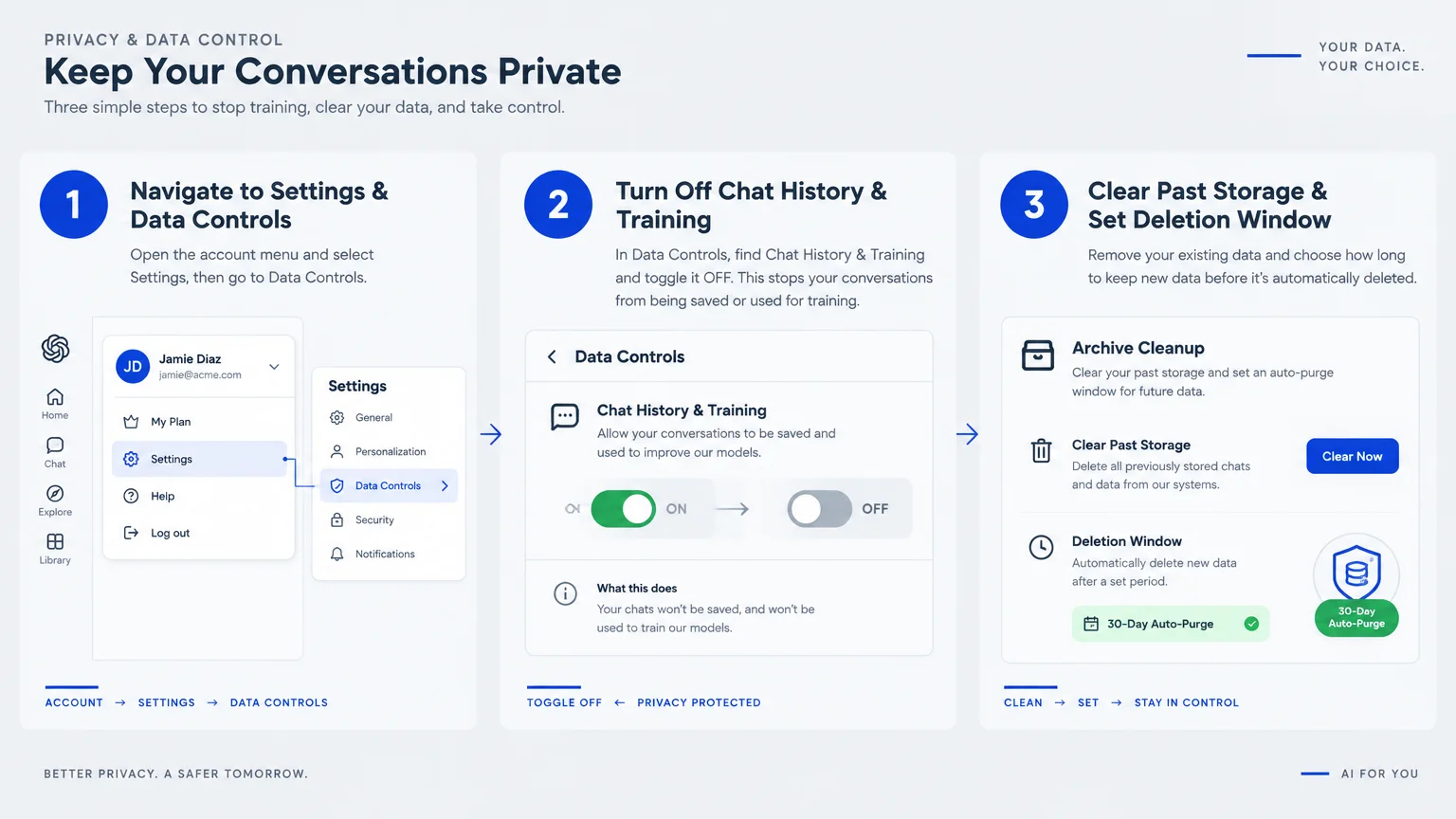
You can dramatically improve your chatbot privacy by taking a few minutes to adjust your account settings.
These step-by-step instructions help you disable data training across the most popular conversational artificial intelligence platforms.
Securing ChatGPT on Your Computer or Phone
OpenAI allows users across all account tiers to disconnect their conversations from model training.
- Log into ChatGPT and select your profile icon in the lower-left corner.
- Click on Settings, then select the Data Controls tab.
- Turn off the toggle labeled “Improve the model for everyone.”
- Disable separate training toggles for voice and video if you use the mobile application.
- Enable Temporary Chat for private sessions that delete records within thirty days.
Disabling Training in Claude
Anthropic updated its privacy controls to let consumer users limit long-term data retention.
- Click your initials or profile picture in Claude and choose Settings.
- Select the Privacy menu tab from the left sidebar.
- Locate the setting named “Help improve our AI models” and switch it off.
- Confirm that your data retention timeframe shifts from 5 years down to 30 days.
Restricting Google Gemini and Meta AI
Google lets you control whether conversational inputs are stored alongside your search history.
- Open your browser and visit your Google Gemini Apps Activity dashboard.
- Turn off the main toggle labeled “Keep Activity.”
- Click “Delete activity by” to erase your past chat interactions immediately.
For Meta AI, remember that U.S. users currently have no option to opt out of AI training.
Because Meta uses chat interactions for ad targeting, avoid sharing any personal facts when using Meta AI tools.

Common Mistakes and Emerging AI Scams Targeting Seniors
Imposters and cybercriminals constantly refine their deceptive tactics by exploiting new artificial intelligence features.
One frequent mistake is assuming that third-party browser add-ons and desktop helper apps are completely safe.
Unverified browser extensions can silently record your conversational prompts and sell your personal details to offshore data brokers.
Scammers also combine leaked personal details with AI voice cloning tools to create terrifying grandparent scams.
A scammer armed with your grandchild’s nickname and school schedule can simulate their voice with alarming accuracy.
They may call demanding emergency bail money or medical funds, using facts you shared in a seemingly innocent chat.
Always establish a private family verbal password that you can use to verify emergencies over the telephone.
Finally, never trust an AI chatbot to verify your official Social Security calculations or file your taxes.
Chatbots can hallucinate financial figures, leading to costly filing penalties or missed retirement benefit opportunities.

Safe and Practical Ways to Use AI Everyday
Protecting your personal data does not mean you must avoid using modern conversational chatbots altogether.
When used with proper caution, these platforms offer tremendous practical benefits that enrich your daily life.
You can safely ask chatbots to suggest creative dinner recipes using ingredients already stored in your pantry.
They excel at generating trivia games, book club discussion questions, and personalized gardening tips for your region.
Chatbots are also wonderful tools for explaining complex technological terms or translating foreign language phrases.
When drafting correspondence, write prompts using generic titles like “the homeowner” rather than your actual name.
Adopt the golden rule of artificial intelligence: never enter anything you would not write on a public postcard.
Following this simple principle keeps you in complete command of your digital privacy while enjoying modern technology.
Frequently Asked Questions
Can an AI chatbot remember what I told it last month?
Yes, many chatbots retain memory across conversations if you leave personal memory settings or account histories enabled.
You can clear this saved memory anytime by opening your account settings and deleting stored personalization notes.
Does deleting my chat conversation permanently erase it from company servers?
Deleting a conversation removes it from your view, but companies usually retain internal copies for up to thirty days.
They keep these short-term records to monitor for system abuse and satisfy safety auditing requirements before final deletion.
Is it safe to upload a picture of my prescription bottle to an AI chatbot?
No, you should never upload photographs of medication containers, health insurance cards, or physician summaries.
Prescription labels display your full name, doctor’s identity, pharmacy location, and Rx number, compromising your health privacy.
What should I do if I accidentally typed my Social Security number into a chatbot?
Delete the conversation immediately, and toggle off model training within your account settings right away.
You should also place a free fraud alert or freeze on your credit reports across all major bureaus.
Are voice assistants like Alexa subject to the same privacy concerns?
Yes, voice assistants capture and process spoken requests just like text chatbots process typed prompt entries.
Review your voice assistant settings periodically to delete past audio recordings and turn off human review permissions.
For additional senior resources, visit
National Institute of Mental Health (NIMH), National Institutes of Health (NIH) and Centers for Medicare & Medicaid Services (CMS).
Disclaimer: The information in this article is for educational purposes only and is not intended to be a substitute for professional financial, legal, or medical advice. Always consult with a qualified expert for advice tailored to your personal situation.